UAT & System Upgrade
Backend Deployment Process, UAT Alignment and System Upgrade
Summary
This document outlines the enhanced SAT v2 deployment process, the creation of UAT instances, and the implementation of multitenancy alongside the upgrade of the codebase from Laravel 10 to Laravel 11. In alignment with our engineering objective of achieving greater system stability and maintainability, I designed and implemented a comprehensive deployment workflow. The Laravel upgrade includes significant improvements to route definitions, scheduler configurations, and application boot procedures, ensuring the platform is well-optimized for future scalability and feature expansion. Each step of the process is thoroughly documented here for your review, feedback, and further contribution. Additionally, this document includes the rationale behind the decision to upgrade to Laravel 11, emphasizing long-term technical and operational benefits.
Laravel 10 to Laravel 11 upgrade
The decision was made to upgrade the SAT v2 codebase to laravel 11 with the following updates.
- Removal of Dingo/Api package - Using native laravel api routing mechanisms is more sustainable and robust as opposed to using Dingo/Api which is a legacy package, this allows us to implement laravel’s native features e.g global rate limiting - Take note that all routes were updated to match the new laravel 11 controller referencing and namespacing conventions, NO ROUTE NAME WAS UPDATED to ensure backwards compatibility. All transformers were migrated to api resources, for more information refer to the
DINGO_MIGRATION.md - Multi-tenancy - New version of multi-tenancy works well with laravel 11
- Laravel 11 migration updates - Access to new migration table functionality not present in laravel 10
- Using the new boot architecture in laravel 11 which modifies the bootstrap/app.php and deprecates the use of Kernel.php files.
- Use of laravel octane to supercharge our application's performance by serving your application using high-powered application servers i.e road-runner - refer to https://laravel.com/docs/11.x/octane#main-content
- Moving schedulers from kernel.php to console.php and adding a service to handle dynamic schedules.
- Implemented the use of redis caching for sessions and normal cache procedures
Kindly refer to https://laravel.com/docs/11.x/releases for more information and also refer to the LARAVEL_11_UPGRADE.md file for more detailed information
Multi-Tenancy Update
The SAT v2 codebase has been updated to handle multi-tenancy operations with the following key considerations:
- Multi tenant - multi domain architecture where a tenant is identified using the subdomain which is tied to the tenant information such as the tenant DB name. There exists an event listener under the
TenancyServiceProvideri.eTimezoneInitializationServicewhich initializes crucial aspects of SAT v2 e.g general settings, timezones, queued jobs error messaging, mailgun host and specific routes. - All migrations were moved to the
migrations/tenantfolder - going forward all tenant related migrations will be added to this folder and executed using the commandtenants:migrate, this also applies to existing single tenant implementations as well, ensuring backwards compatibility. - The main routes entry point has been updated to
tenant.phpfile which initializes both theweb.phproute and theapi.phproute, all other routes on the file are central routes which are accessible using the tenant and the central route and will be used mainly for: - Configuring/Creating the tenant
- Application health checks and monitoring
- Addition of the
tenancy:schedulecommand which will be used in running schedulers across all tenants, this is an update from the usualschedule:runto implement tenant aware scheduler instances. - Addition of tenancy checks on controllers that had model logic on the constructor i.e
stancl/tenancyis not able to initialize tenants on the controller constructor by default, therefore a tenancy check was put in place to fix this problem, I have updated all relevant controllers to match this. - Addition of tenancy migrations i.e
tenantsanddomainsmigrations - these migrations should always be configured outside thetenantfolder and is executed using theartisan migratecommand. Thedomainsmigration contains a script to create the tenant record on migration, this is done to handle backwards compatibility and enable setting up single tenants on existing client deployments.
SAT V2 Classic Deployment Process
For easier migration we will retain the current client deployments as is with major updates i.e
- Revoking ssh access to all client deployments for all backend team members except for Arif and Morris, this access is universal and can be delegated to any other team member in the event that the two are not present, this access should be strict and prevent the checking out of branches on the code deployment folder.
- We will retain our normal monday deployments - with minor tweaks on the command - refer to
configurations/scripts/pull-changes.sh - A button has been added on portal against the client account, this button will be used to trigger a
dispatch_runworkflow that pulls main branch changes to the specified client’s deployment.
SAT V2 GCP Deployment Process
For GCP deployments we will use a new workflow and procedure using the illustration below
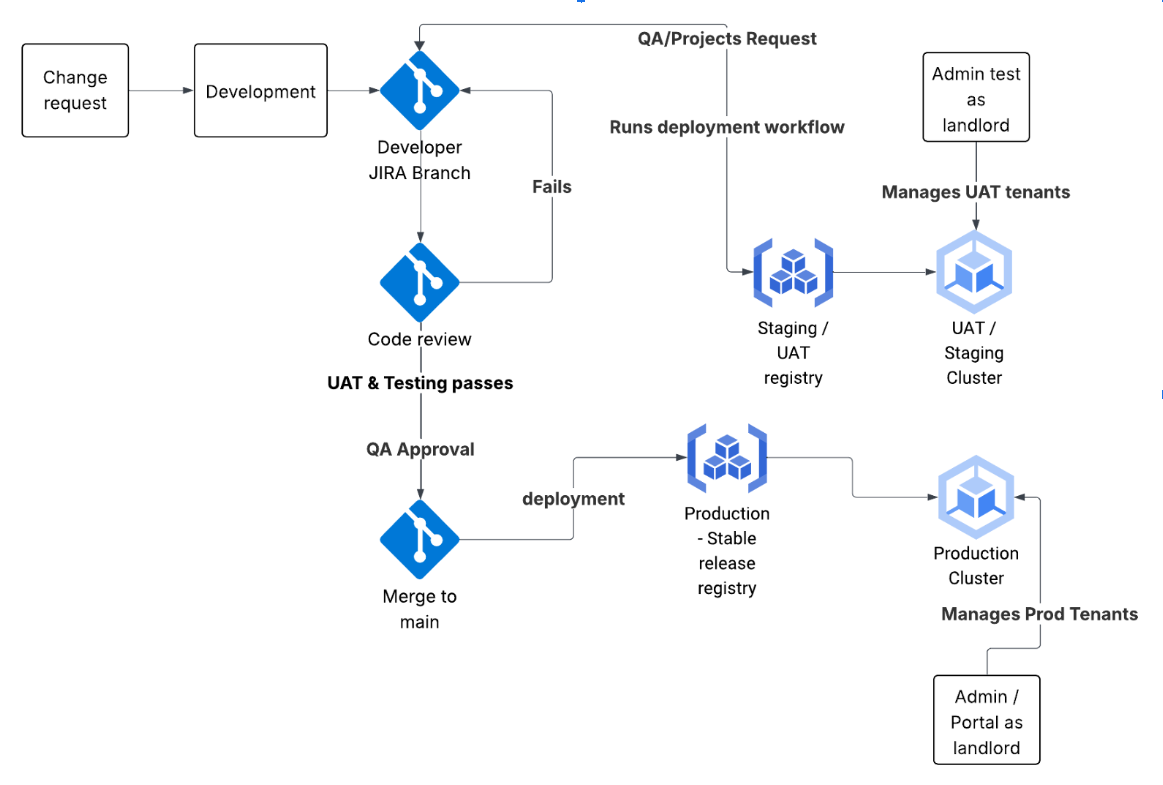
The new deployment process has the following key considerations
- SAT V2 codebase will use docker containerization to bundle the whole codebase under one container with all the necessary dependencies, configurations and custom startup scripts, the docker image to be used can be found under - https://github.com/Solutech-Limited/docker-webserver repository
- This deployment will run on a Google Kubernetes cluster with the following structure
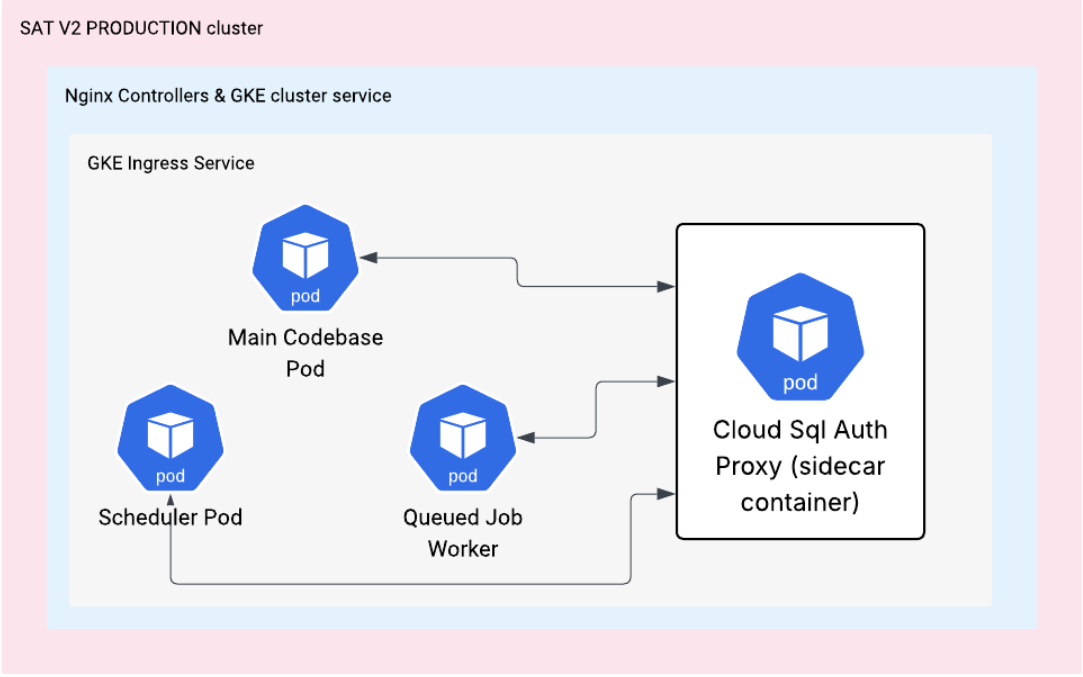
- The involved components are as follows:
- SAT v2 multi-tenant application running on laravel octane (road runner plugin - https://laravel.com/docs/11.x/octane#roadrunner) on port 8000
- GKE autopilot cluster
- GKE Nginx controllers
- A Main Service GKE pod running on the
octane-entrypoint.shscript - this pod will be autoscaled automatically to the defined maximum pod instances (its currently set to a max of 2 on 90% usage). - A Cloud Sql Proxy running a sidecar container for each of the deployed pods, this container will be used to connect to the DB using localhost
127.0.0.1as the host, a GKE service account configured with the appropriate permissions and a super user with set credentials. - A cloud logger - all logs from each pod will be stored and monitored on the google cloud logger, this includes errors, info and api logs. This is to ensure a common platform for logging and monitoring of the application. The logs have been carefully labeled to distinguish between the various severity statuses.
- A tenancy scheduler pod - running on the
tenancy_scheduler.shscript, this pod will be used to handle scheduling and execution of static and dynamic schedules. - A queue worker pod - running on the
queue_worker.shscript, this pod will be used to process all queued job processes. - A kubernetes config map - this will be used to store and copy ENV variables and make them accessible to the various pods on deployment.
- An Ingress service - this will be used to expose the pods to the public using a public ip and a configured subdomain / wildcard subdomain. This pod also contains ssl configs and custom request entry rules - see the
k8sfolder. - Cloud Memory store (Redis) - all deployments deployed on GKE will use the Cloud memory store to cache data, the codebase is configured to store and isolate tenant cache data. See -
config/tenancy.php - All ingress serving pods e.g the main service pod will utilize the kubernetes rolling updates feature, where we have
liveness-checkand areadiness-checkendpoints, in the event that one of the endpoints fails or a timeout happens the pod will be restarted and any update to these endpoints should be avoided. - Google Cloud Sql (Mysql) will be used to store and persist data, similar to what we have on Digital Ocean.
SAT V2 UAT Deployment Process
In the event that a QA / PM or Developer wants to perform a test or UAT, they can spin up a custom UAT environment similar to the production environment with the following steps:
- On
portal.solutechlabs.comselect the desired client from the clients list and click on theUAT instancestab.
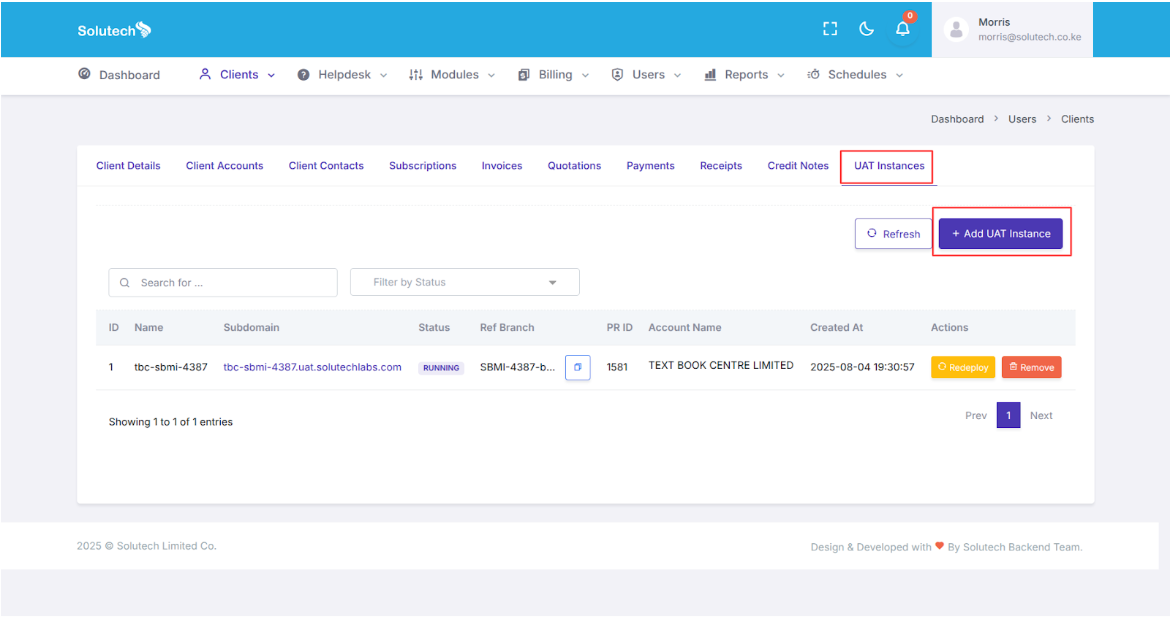
- Click on the Add UAT instance button and you will be presented with the form below, select the client account (since they might be multiple e.g Tradco) and then select the pr / branch that contains your latest changes.
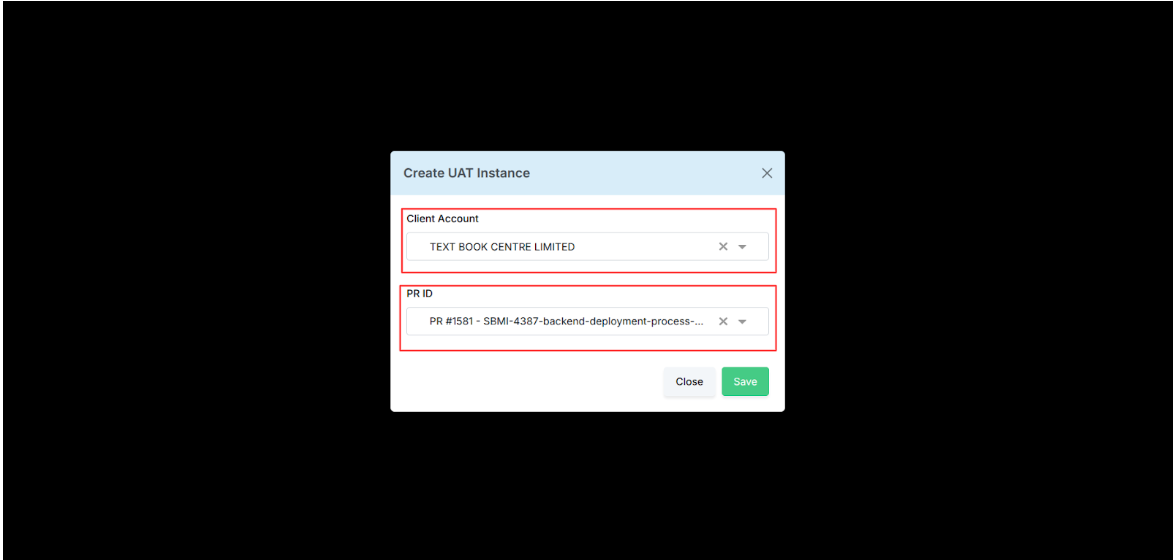
- Click on the save button and a confirmation window will popup, once you confirm, you should get a success message after which the system will initiate the creation of a new UAT instance using the following steps.
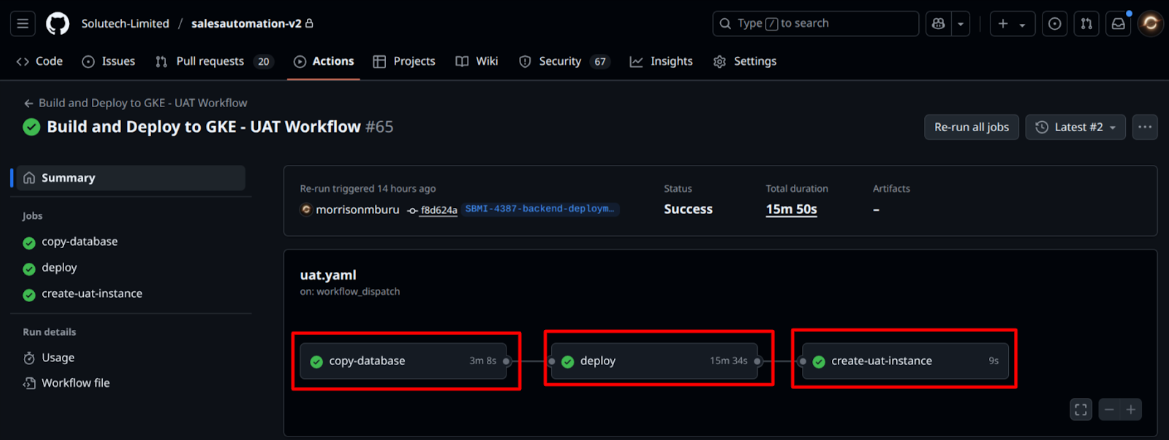
- Once the deployment is complete a new UAT instance will be created and can be accessed using the uat instance link and the uat instance client code (on the mobile app) as illustrated below:
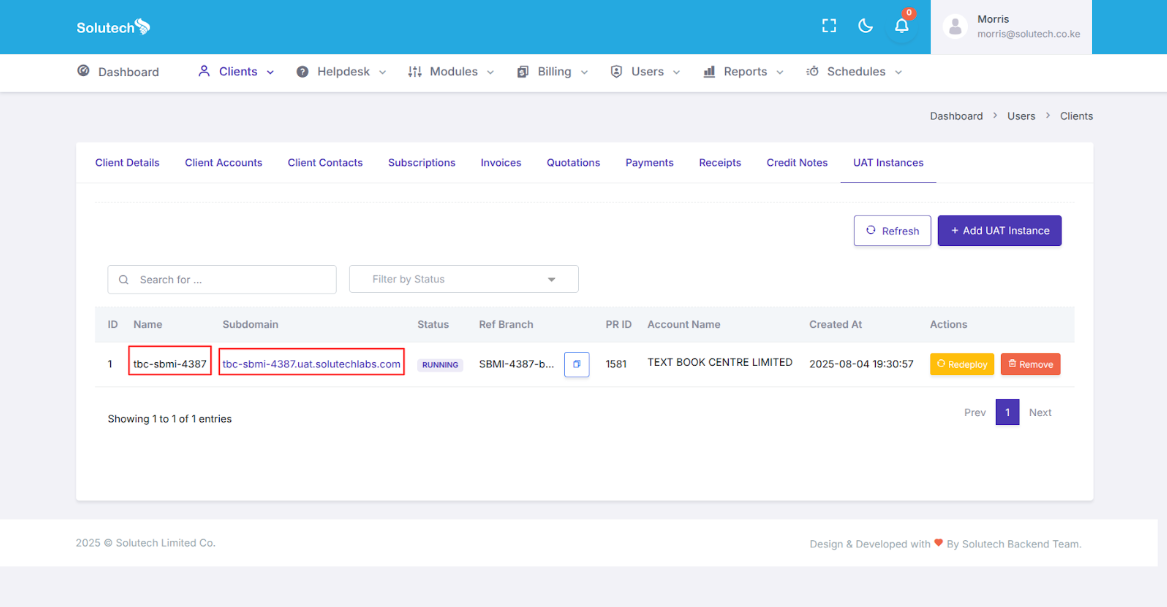
- The UAT instance goes through the following statuses:
In Progress- Updated during the creation process and redeploymentCompleted- Updated once the uat instance creation / redeployment process has been completedRunning- Updated once the UAT instance is accessible via the urlFailed- Updated when creation of the UAT instance fails- Once a UAT instance is created and running it can be redeployed or removed, redeploying means deploying the latest version of the UAT branch to the UAT instance while removing means removing the UAT instance completely which will perform the following operations:
- Delete the UAT instance on portal
- Delete the copied UAT database
- Delete the UAT instance & tenant
- Delete the UAT client sub account on admin test
- All UAT related events are handled by github actions and a webhook has been set in place to ensure that once an event happens on the
worflow_runit is updated on the admin portal therefore ensuring consistent status updates.